A calm focus timer for iOS & Android
Your focus,
undisturbed
Ever notice how most timer apps are... a lot? Streaks nagging you, leaderboards you didn't ask for, badges for breathing. We made the opposite of that. A calm focus timer for iOS and Android that gets out of your way.


iOS 17+ · Android 8+ · Privacy first · No account needed
Dead simple
You won't need a tutorial. Seriously.
Pick a mode
Work (25min), Flow (50min), or Research (90min). Premium lets you set custom durations, but honestly the presets cover most people.
Watch the dots fill
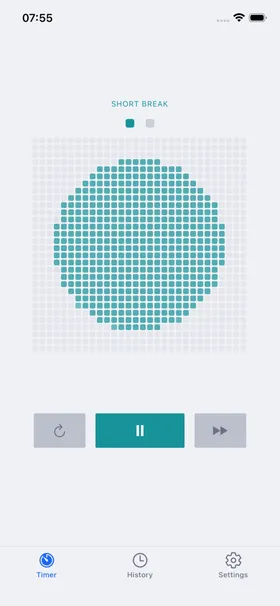
The 900-dot grid fills radially from the center as time passes. It's the kind of thing you glance at, not stare at.
Break happens automatically
When the timer ends, the break starts on its own. The palette shifts to teal so you know it's rest time without reading anything.
Check your patterns (if you want)
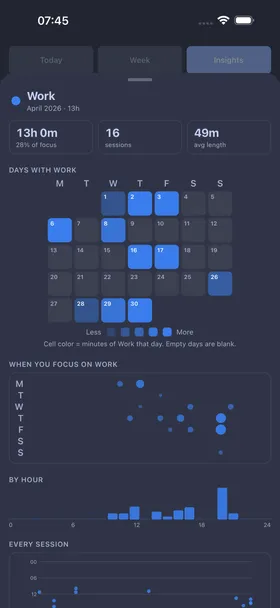
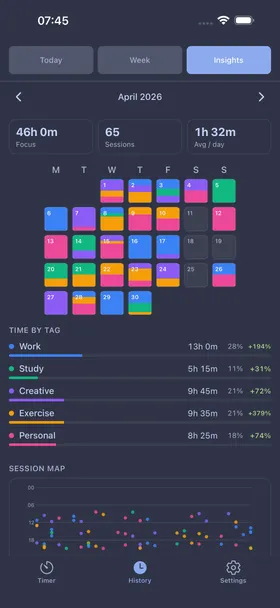
Premium shows weekly summaries, tag breakdowns, and a calendar heatmap. Totally optional. The timer works great without it.
Questions people actually ask
Short answers, no marketing. If something is missing, ask us.
Is Nagi free?
Yes. The timer, the three presets, automatic breaks, the built-in tags, widgets, and Live Activities are all free, with no ads. Nagi Pro is an optional upgrade for custom durations, custom tags, and full session history with weekly insights — available as a monthly or annual subscription, or a one-time lifetime purchase.
Does it work offline?
Always. Nagi never needs a network connection. There is no account to sign up for, no sync, and no server that has to be reachable for the timer to run.
Are there streaks, badges, or leaderboards?
No, and that is the whole point. There are no streaks, no daily goals, no points or achievements, no leaderboards, and no social features. Skipping a day costs you nothing and the app never asks you to come back.
What timer lengths does it have?
Three built-in focus presets: Work at 25 minutes, Flow at 50 minutes, and Research at 90 minutes. Breaks start automatically when a session ends. Nagi Pro adds custom focus and break durations of any length.
What is the dot grid?
Instead of digits counting down, Nagi shows your session as a 30x30 grid of 900 dots that fills in gradually from the center. It is meant to be glanceable rather than something you watch — you can read your progress in a second without seeing seconds disappear.
Does Nagi collect any data?
No. Sessions, tags, and preferences are stored locally on your device. There are no accounts, no analytics inside the app, and no servers collecting your focus habits.
Which platforms does it run on?
iPhone on iOS 17 or later, and Android 8 or later. Both versions are free downloads from the App Store and Google Play.
What languages does Nagi support?
English and German. The app follows your system language and your system light or dark theme.
Why is it called "Nagi"?
凪 (nagi) is Japanese for a calm, windless sea — focus that feels like stillness rather than a race. Nagi is built by bugsntea, an independent developer.